design
Marketing & Data Platform Aperia Design System U.S Banking System Mental Health Mobile App Medical Product
about
Manh Tai
linkedin resume
Manh Tai
Manh Tai
Marketing & Data Platform Aperia Design System U.S Banking System Mental Health Mobile App Medical Product
about linkedin resume

THANKS FOR STOPPING BY!

Ping me: manhtaiphung@gmail.com

  • Overview
  • Problem
  • Design Statement
  • Goal
  • Research
  • User Interview
  • Findings from interview
  • User Personas
  • Design decision
  • Major design decision #1
  • Major design decision #2
  • Major design decision #3
  • Results
  • Client Feedback
  • Reflection
Apollo dashboard preview with the Simplifying Complex Campaign Workflows banner
APOLLOSimplifying Complex Campaign Workflows

Result: cutting manual processing by 40%, and saving around 200 hours per month. It also improved conversion by 15%.

client VNG Data Studio Team
Role Senior Product Design, User Research
Team Development Team, Product Owner, Product Manager, Head of product
Timeline 4 months

Overview

About Apollo

Apollo is a marketing platform designed to unify how VNG Games’ studios manage campaigns from planning to execution. Before Apollo, teams were working across fragmented tools and siloed data, making it harder to align strategy, capture opportunities, and measure ROI with confidence.

Apollo brings these workflows into a single system, giving teams the structure, visibility, and insights they need to run more effective marketing campaigns.

Problem

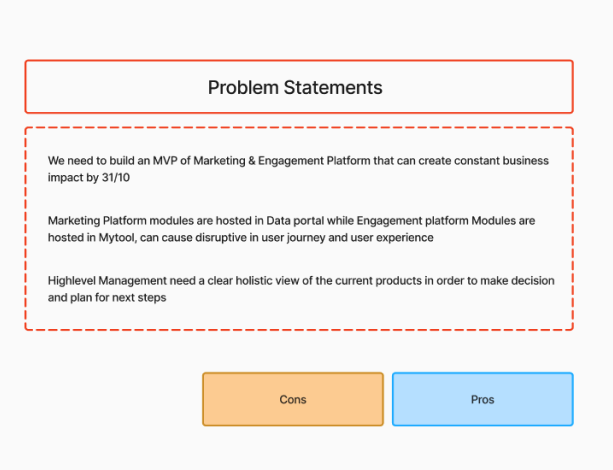
Fragmented marketing operations slowed decision-making and execution

VNG Games’ studios were working with a marketing setup that was:

  • Hard to evaluate and forecast, making it difficult to assess game potential and plan with confidence.
  • Weak in planning, with limited support for building and comparing different business scenarios.
  • Limited in insights, reducing visibility into user behavior and campaign performance.
  • Fragmented across channels, making execution less efficient and ROI harder to measure.
Problem statements comparison board
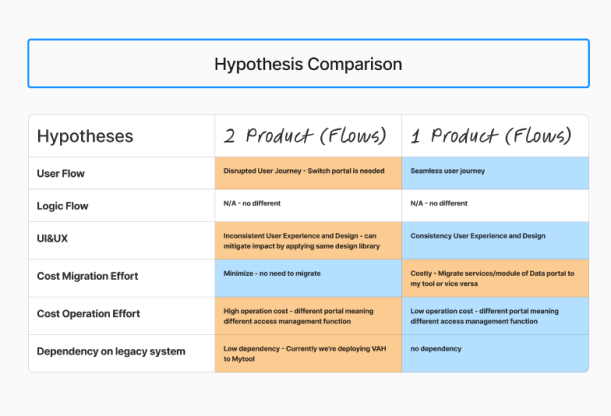
Hypothesis comparison table

Design Statement

How might we give game studio teams the tools and insights they need to make better marketing decisions throughout the campaign lifecycle?

Goals

Goals

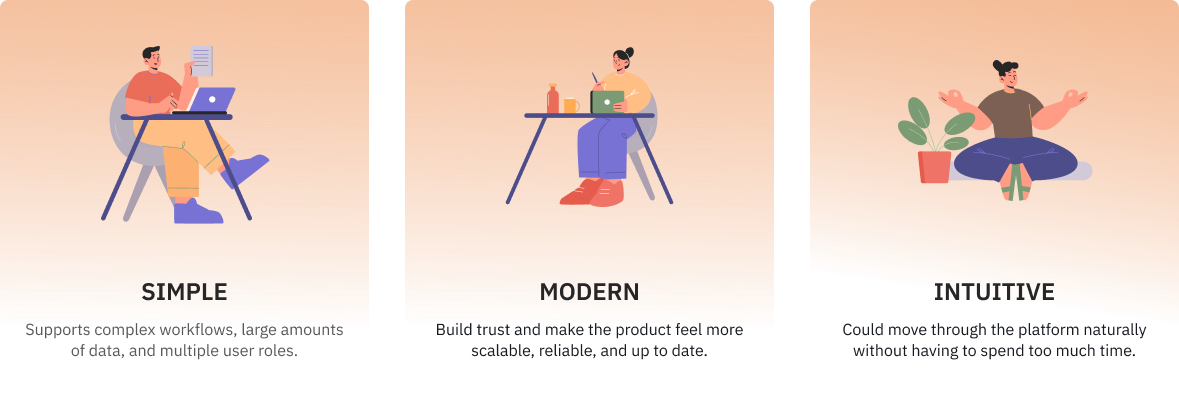
VNG Games’ studios needs a new platform that is

Simple, modern, and intuitive goal cards

In total

The new platform helped VNG reduce

50% manual processing
200+ Hours of working

Research

User interviews

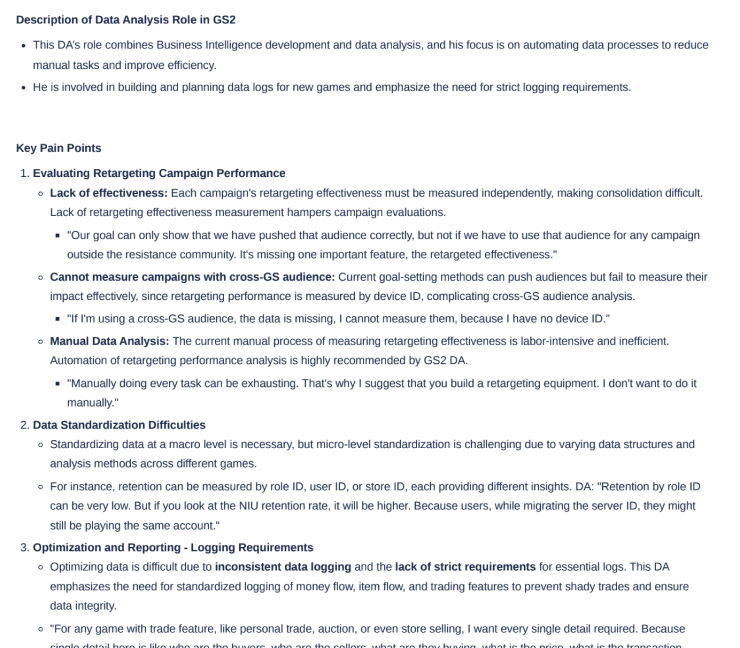
We interviewed 12 stakeholders across studio teams, including heads of department and team members, to understand both data needs at the leadership level and usability pain points in daily workflows.

  • For head of department, they needed clearer visibility into forecasting, scenario planning, ROI, and campaign performance to make faster and more confident decisions.
  • For team member, they needed a workflow that was easier to use day to day, with better support for analytics, segmentation, testing, automation, and campaign optimization.

Main Insight

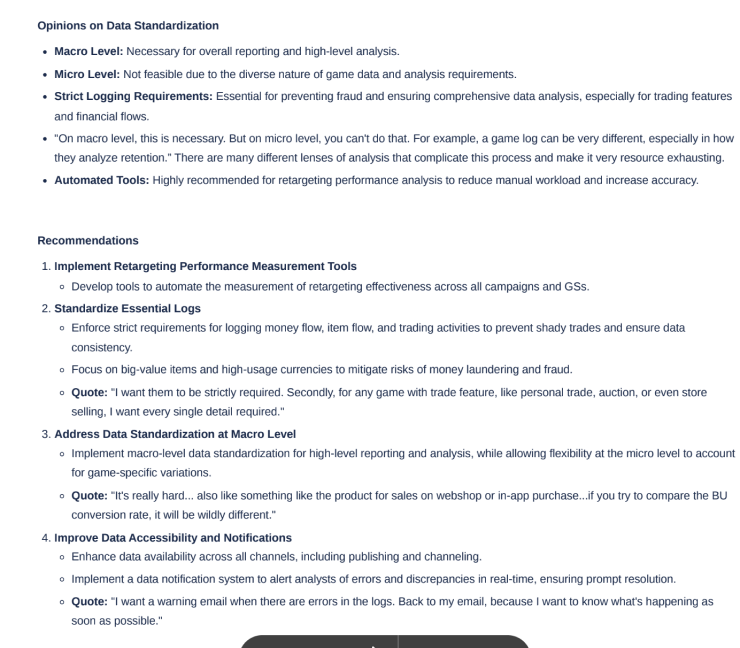
Findings from interview

Head of department:Needed better support for forecasting, scenario planning, and performance visibility.

Team member:Needed a workflow that made analytics, execution, and optimization easier to manage day to day.

Both:Needed a more unified platform that reduced fragmentation and supported faster, data-informed decisions.

User interview synthesis board

User Interview

Research

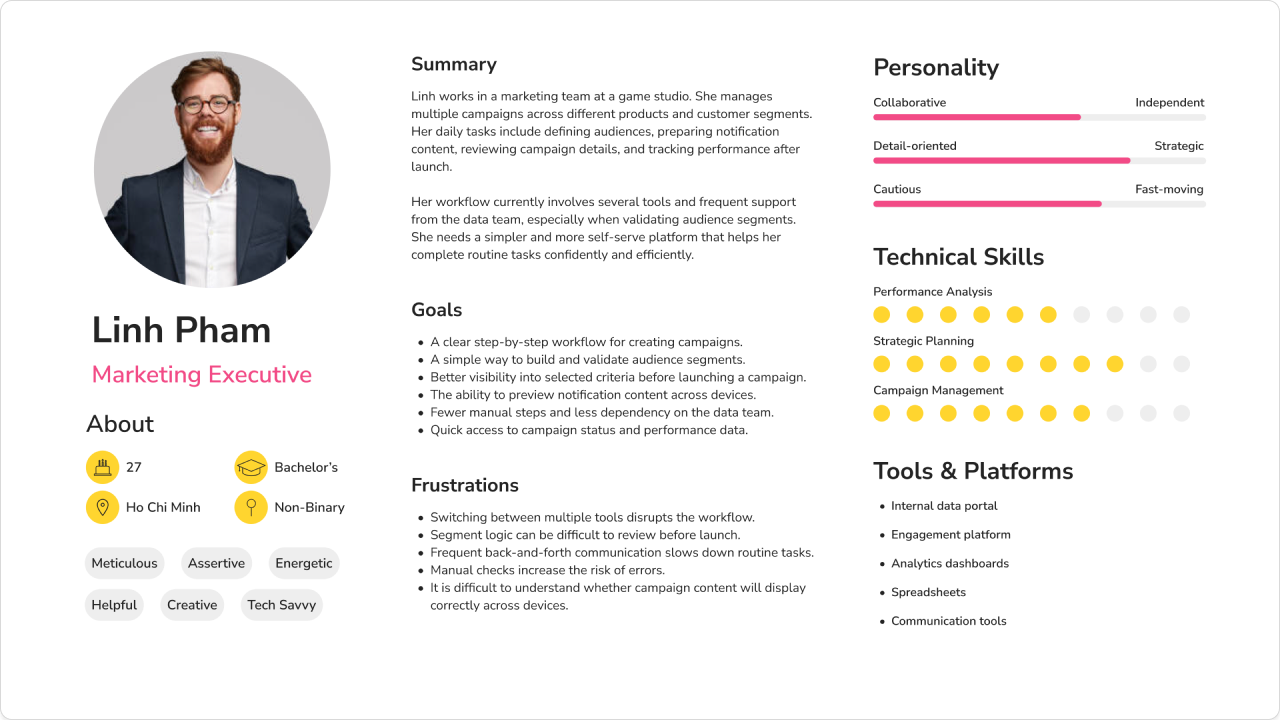
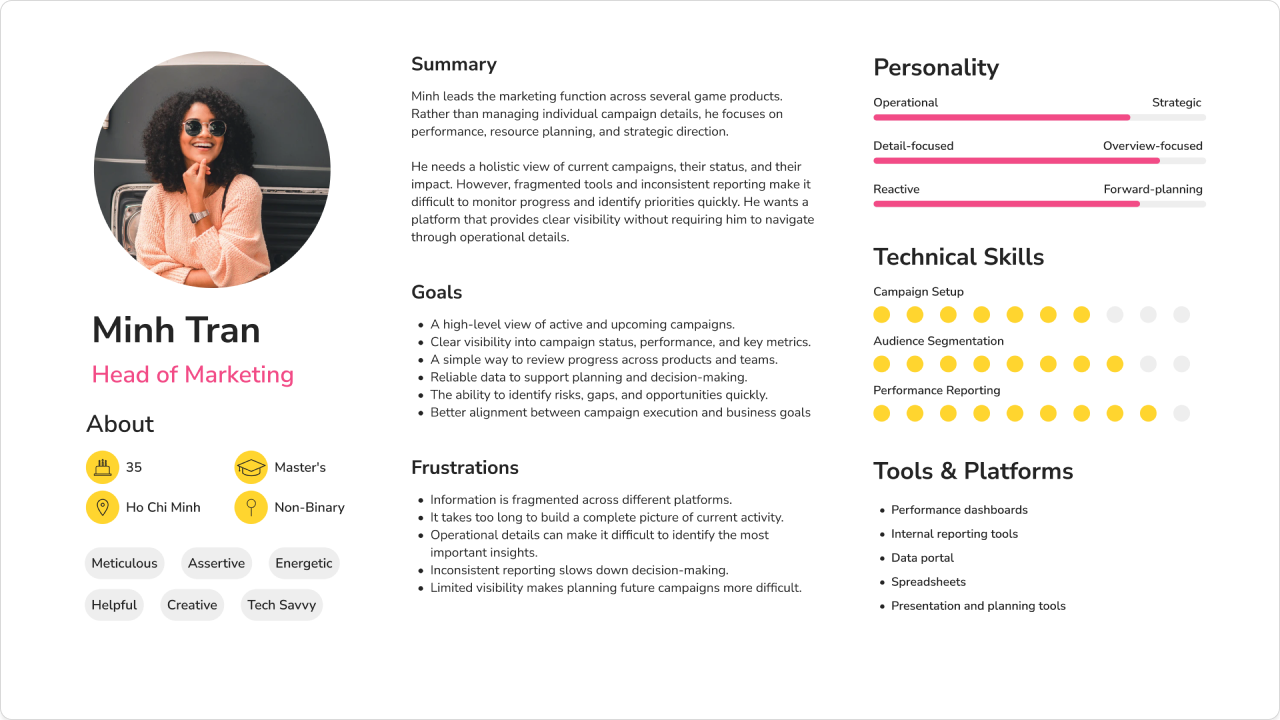
User Personas

Based on the collected insights, We created two personas to help guide the design and development strategy.

Head of department persona card
Daily campaign operator persona card

Major design decision #1

Different user groups needed different levels of information

Since senior stakeholders and daily users had different needs, We designed a layered experience that supports both quick oversight and detailed execution.

Enable fast strategic oversight

Help senior stakeholders understand what matters quickly, without digging through operational detail.

Support focused task execution

Reduce cognitive load during task execution.

Before

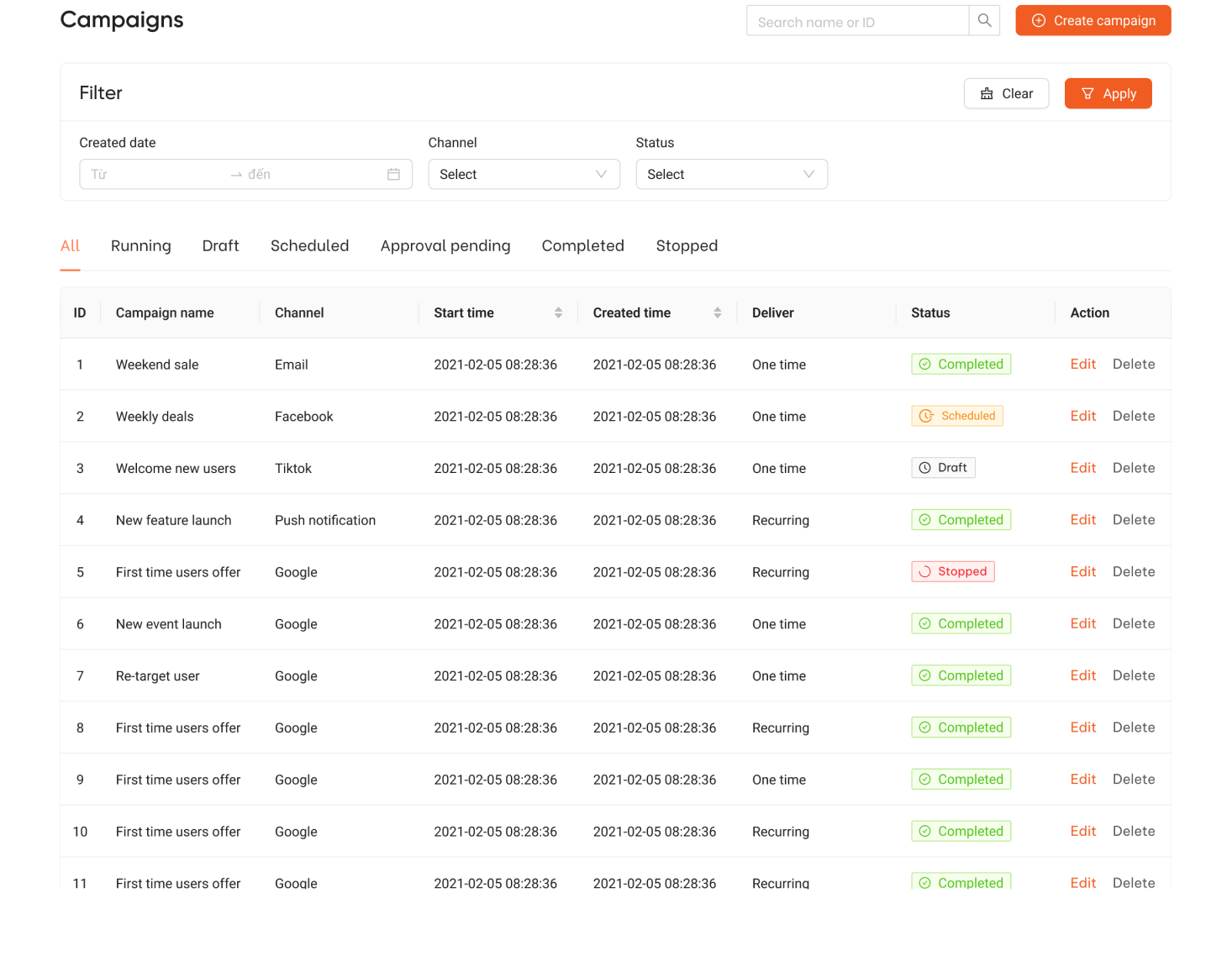
Before the redesign, Apollo used a combined interface for both creators and admins. This meant users with very different goals had to navigate the same view, which made the experience more complex, less focused, and harder to use efficiently. We separated the experience into distinct creator and admin views so each user group could see the right level of information, actions, and workflow context for their role.

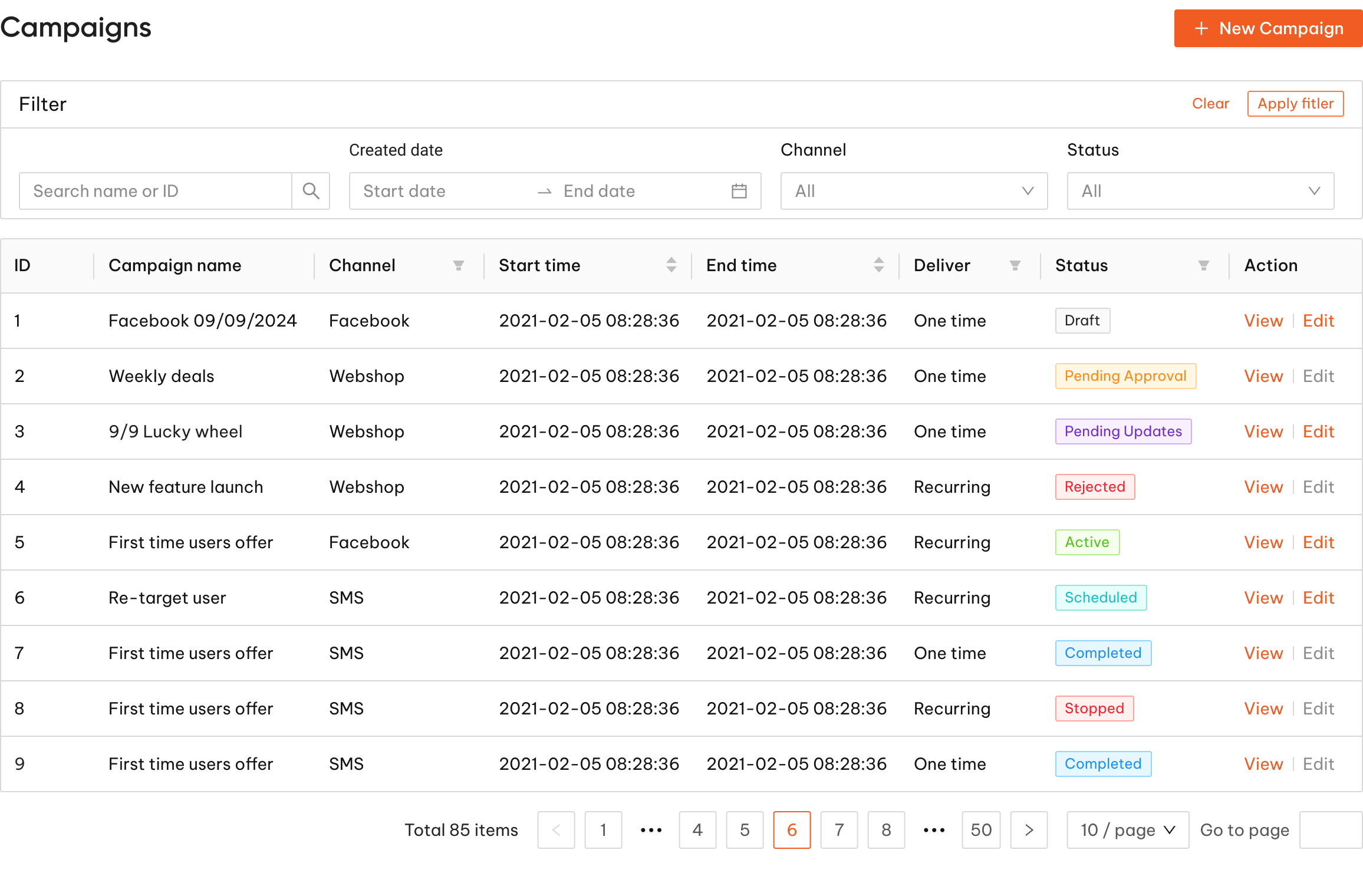
Campaign table with oversight signals

After

We introduced role-specific views that matched each user’s job more closely. Creators could focus on building and tracking campaigns, while admins could focus on approval, oversight, and status management. We start with user flow and then design for the 2 workflow.

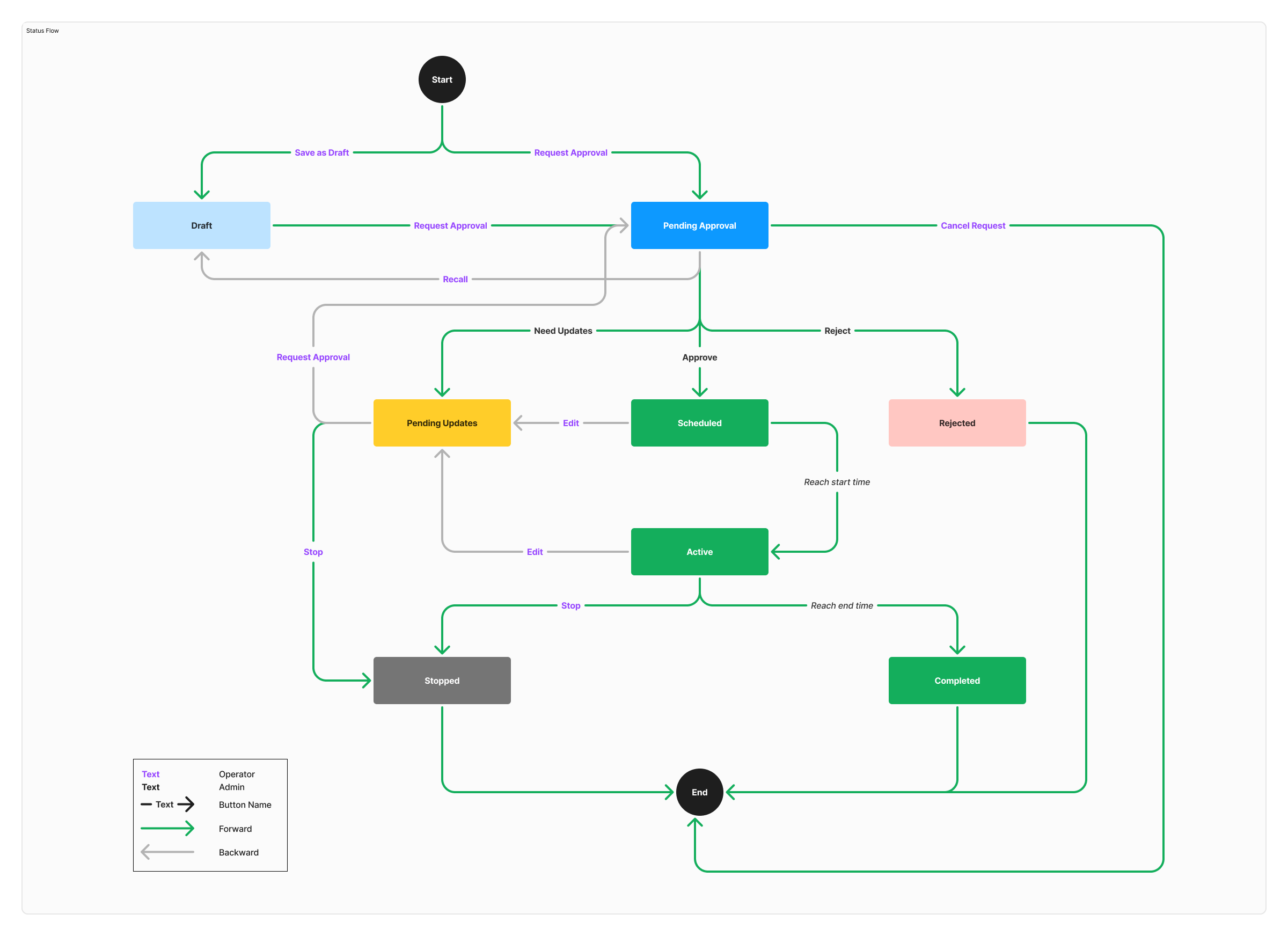
Approval flow that supports review, revision, and launch.

The workflow maps how campaigns move from draft to approval, scheduling, activation, and completion, with clear paths for updates, rejection, recall, and stop actions. This improves status clarity and makes the process more reliable for both operators and approvers.

Approval flow from draft to launch and completion

Status column: Uses clear visual labels to help users scan campaign progress and identify what needs attention.

Add new campaign: Highlights the primary entry point into campaign creation.

Pending Approval: Surfaces campaigns waiting for review.

Active: Highlights campaigns that are currently live.

All: Provides a complete view across every status.

Creator View
Creator view campaign workflow

Filter by status: Helps users quickly sort and manage campaigns by workflow stage.

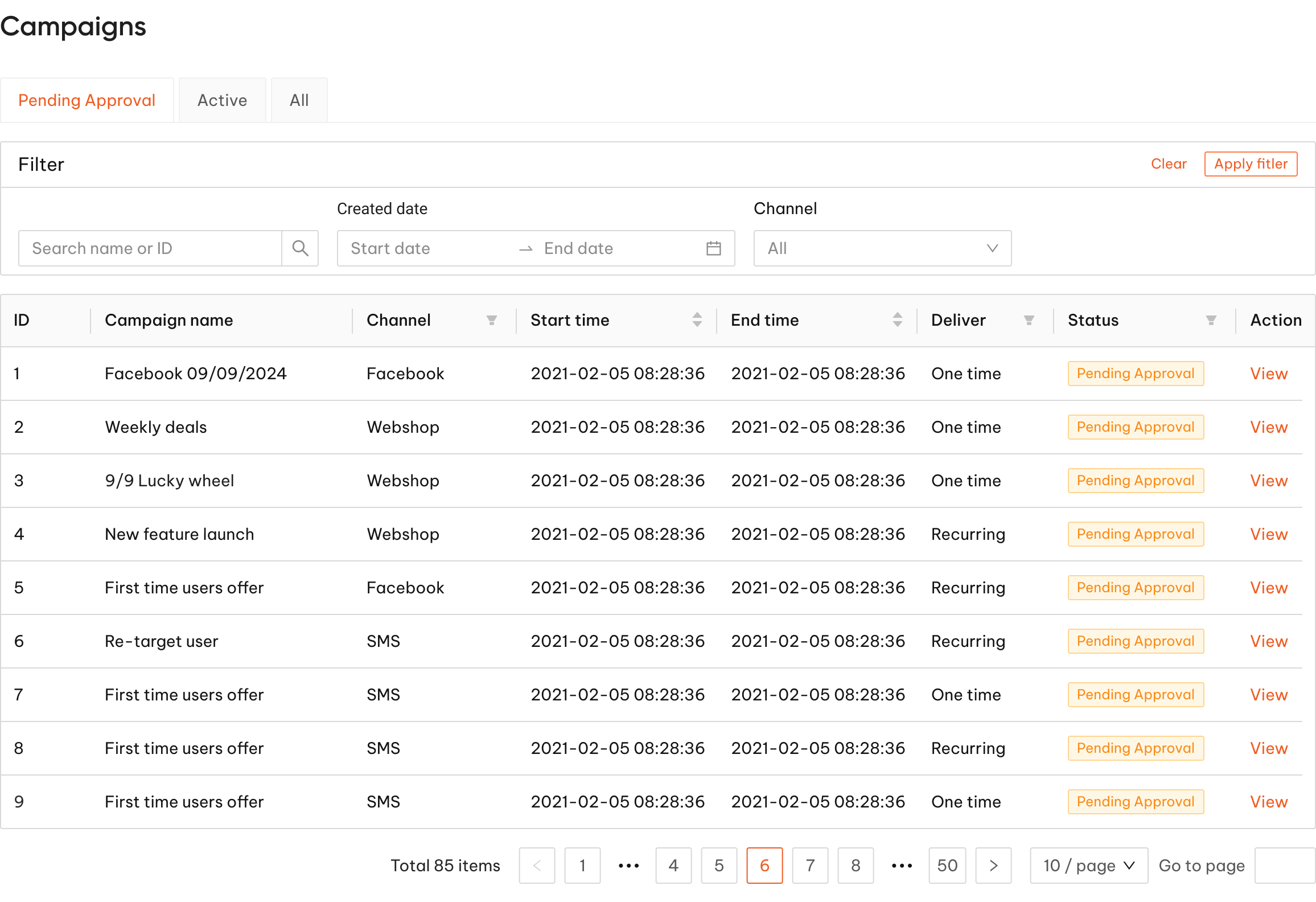
Admin View
Admin view analytics workflow

Filter by status: Helps users quickly sort and manage campaigns by workflow stage.

View: To view the campaign overview, using for both admin view and creator view

Edit: To change the campaign overview, using for creator view

Pending Approval: Surfaces campaigns waiting for review.

Active: Highlights campaigns that are currently live.

All: Provides a complete view across every status.

User Feedback

The flow makes approval work visible and easy to scan, but it needs stronger prioritisation signals so senior stakeholders can quickly identify urgent or high-impact campaigns.

The flow feels clear and structured, but daily users need more obvious next actions and stronger feedback on what requires follow-up.

Team Feedback

The flow is easy to scan and helps me quickly see which campaigns are pending approval. However, I need clearer next actions from this view so I can manage follow-ups more efficiently.

Major design decision #2

Made segment creation clearer and more self-serve

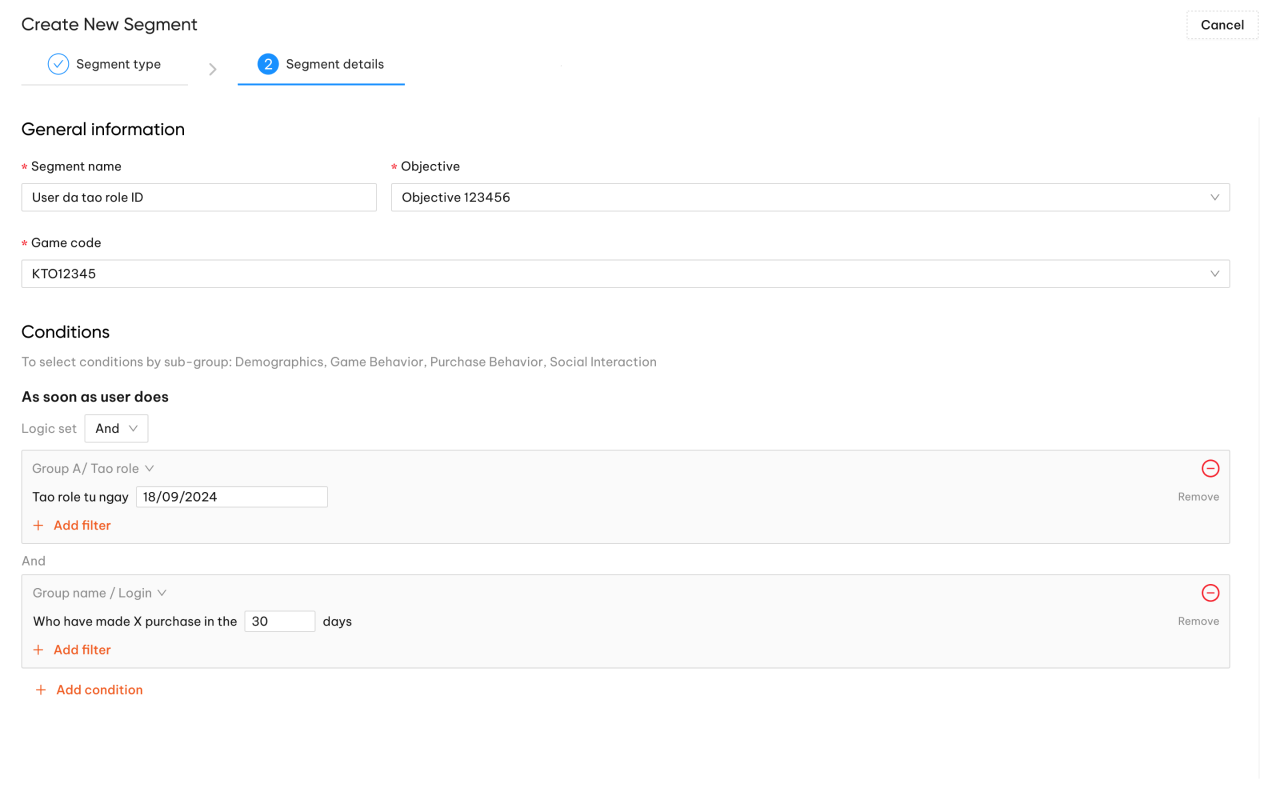
We redesigned the segment creation flow to give users a clearer step-by-step process and the ability to generate audience data directly through configurable conditions. The goal was to reduce reliance on the data team, lower the risk of setup errors, and make segment creation faster and more reliable for marketing teams.

Before

Before segment creation workflow

Users feedback

The segment creation difficult because it was hard to understand whether the logic had been set up correctly.

After

We introduced in-flow segment preview, giving users immediate visibility into the output and reducing support time by around 2 hours a day.

Create Segment
Review/ Preview
Finalize
Choose Segment Type
Segment Info
Segment Condition
Preview Segment
Save Segment
Approve Asset

Users feedback

The flow makes segment work visible and easy to scan, easier to understand and reduced the need to work with the data team for mock data.

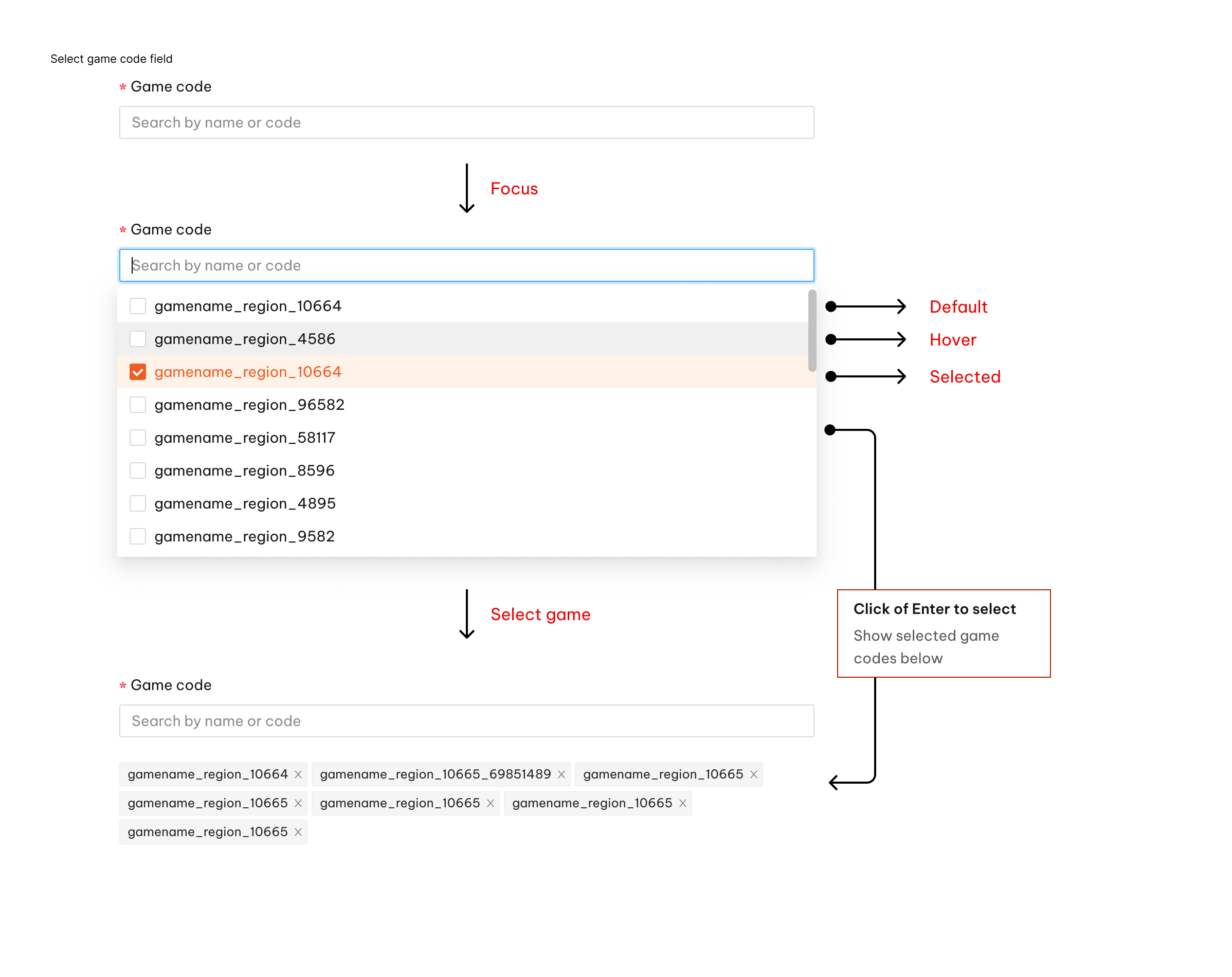
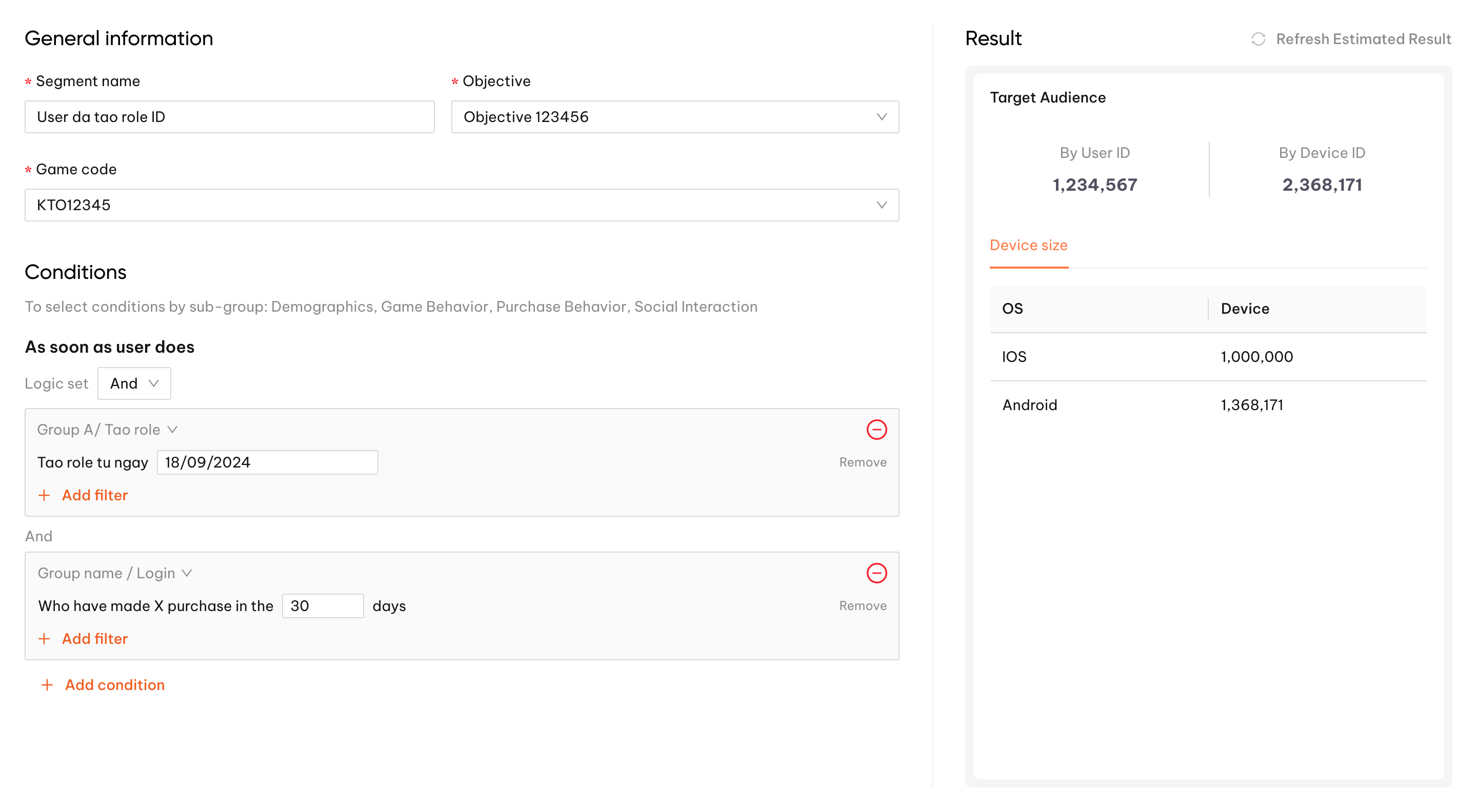
Game code multi-select behavior Segment conditions and target audience result

The change from single select to multi-select in one of the fields. It gave them more flexibility when setting up segment conditions and made the workflow feel more practical for real campaign needs.

The results are split by User ID and Device ID, with a further breakdown across iOS and Android. This gives the marketing team clearer visibility into the target audience on each device type, making it easier to plan and tailor campaigns more effectively.

Major design decision #3

70% of users swipe up after receiving the notification on mobile.

Research showed that the previous notification text was fixed and not customisable, limiting how well the message could be tailored to users. This indicates that the fixed, non-customisable notification copy may have reduced message relevance, leading many users to dismiss it rather than engage.

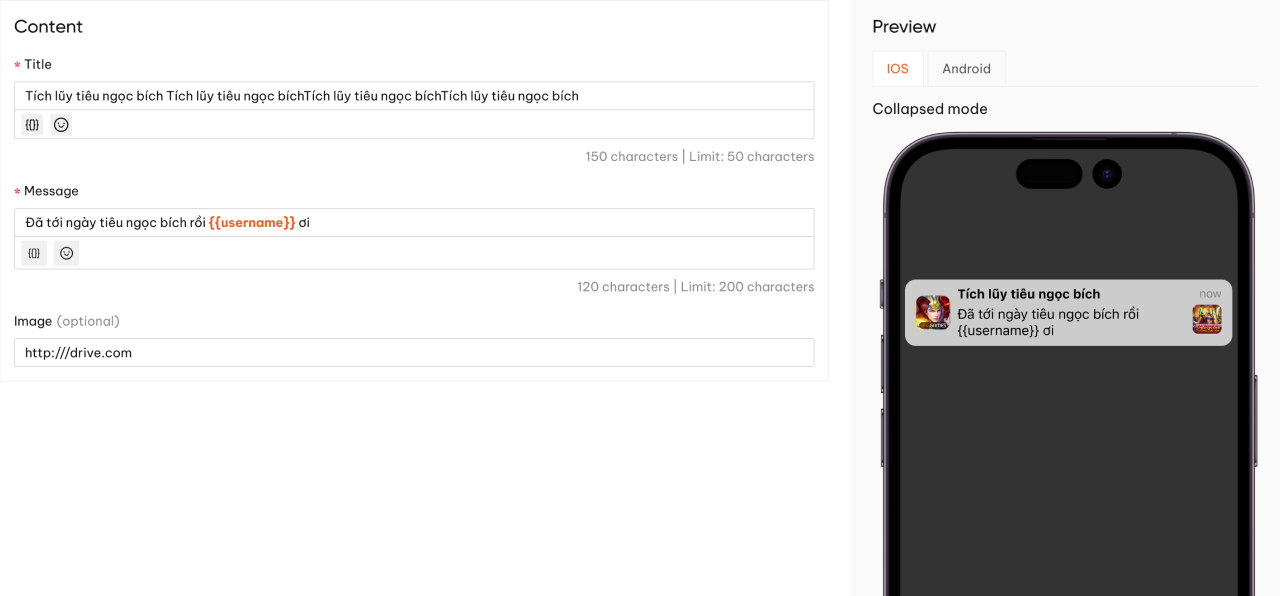
Notification builder detail view

Title: Allows users to customise the notification headline, helping the message feel more relevant and attention-grabbing at first glance.

Message: Supports a more detailed notification body, including dynamic variables such as username, so the content can feel more personalised and contextual.

Image: Lets users add an optional image to enrich the notification visually and make the content more engaging.

Preview: Shows a real-time mobile preview across iOS and Android, helping users check how the notification will appear before launch.

Before

After

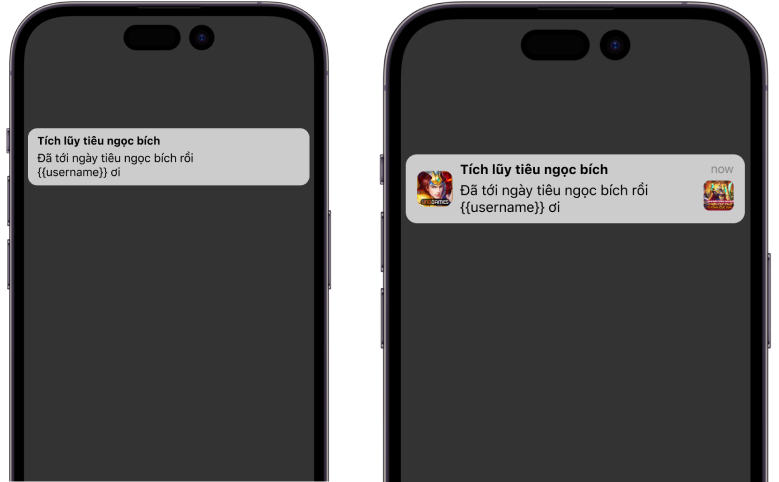
Before and after notification preview

Preview NotificationVersion 1 (Before Apollo launch)

Preview NotificationVersion 2 (After Launch)

Result

Measuring Success

My designs are being implemented by the Engineering Team and was launched in 2024. To evaluate the impact of the design, we measure:

Customer Support Metrics

Apollo reduced manual processing by 40%, saving approximately 200 hours per month. This shows the redesign lowered operational support burden and reduced the amount of manual intervention needed to keep campaigns moving.

Convertion metrics

After launch, Apollo increased conversion by 15% and reduced abandonment by 20%. These results suggest the simplified workflow and improved interaction patterns helped more users complete the journey successfully.

Task Completion

The redesigned campaign creation workflow reduced completion time from 3 days to under 2 hours. This was a strong signal that the new flow made the process faster, clearer, and easier to complete.

User Engagement & Satisfaction

Content sharing increased by 40% versus the previous version, showing stronger user engagement with the updated workflow.

Since lauched, Apollo has gained

50% manual processing
200+ Hours of working

Client Feeback

Trang

Lead Design at VNG Corporation

“Tai is a thoughtful and highly capable UI/UX designer who brings a strong balance of product thinking, execution quality, and collaboration. He works especially well on complex systems, where clarity, structure, and user flow matter as much as visual design. What stands out in Tai’s work is his ability to turn messy requirements into experiences that feel intuitive, purposeful, and scalable.

He approaches design with both curiosity and discipline. He does not stop at surface-level UI improvements, but looks deeper into user needs, workflow friction, and business context before making decisions. He is also strong at translating insights into practical solutions, whether through journey mapping, interaction design, prototyping, or refining product flows with engineers and stakeholders.

Tai is collaborative, receptive to feedback, and committed to improving the quality of both the product and the design process. He communicates his rationale clearly, works well across functions, and shows real maturity in how he handles iteration and trade-offs. I see him as a designer with strong potential to continue growing into a highly impactful product designer.”


Reflection

Learnings

This project strengthened my ability to design for complexity at the workflow level, not just the screen level. It taught me how to balance business rules, user needs, and system scalability, while using clearer structure and interaction design to reduce friction in high-frequency operational tasks.

Early developer involvement

In the past, I relied on my design lead or product manager to coordinate with developers. Because of that habit, I only consulted developers after designing the first feature for Apollo, which led to me redoing part of the user flows. Now, I involve developers early to confirm the design's feasibility and avoid rework.

Flexible mindset

Although I always strive for the best experience, I also learned that business goal often require compromises. In this project, I recognized the need for flexibility instead of getting stuck on perfecting every detail. I learn to identify design elements that can be simplified or postponed without sacrificing the core experience.

MY OTHER WORKS

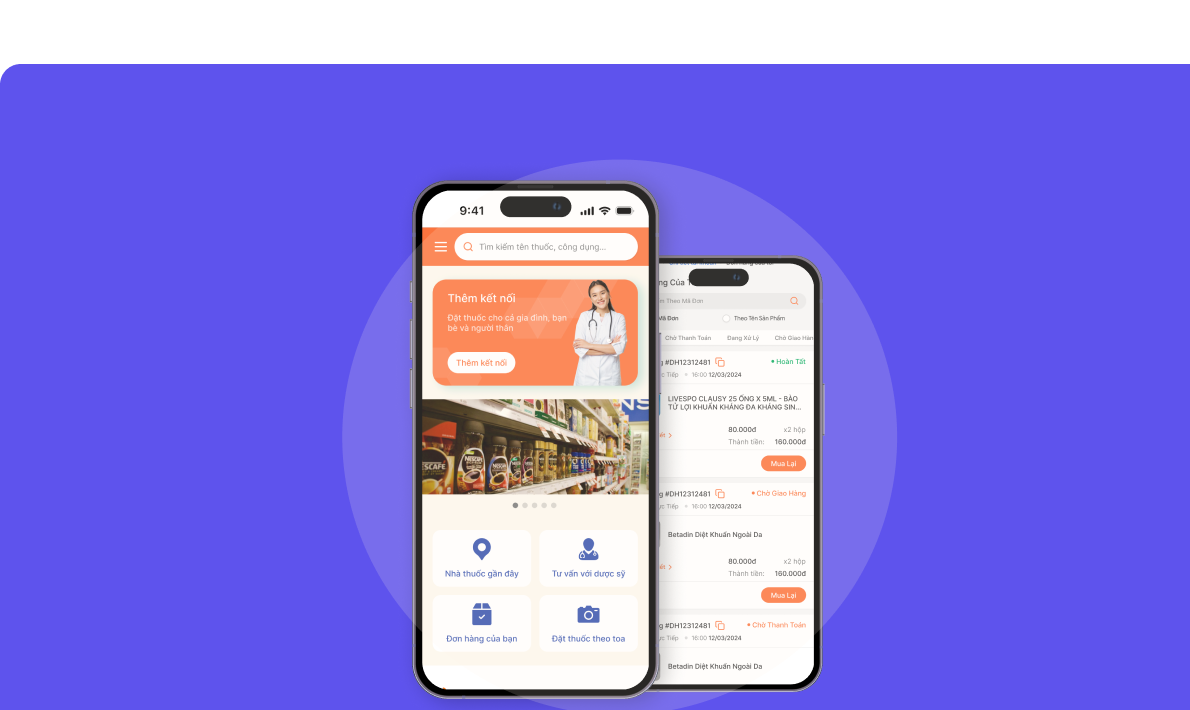
Scaling pharmacy onboarding across mobile and POS

Scaling pharmacy onboarding across mobile and POS

Helping drive 1,000+ active users in 14 days across 1,000+ pharmacy chains

Design systems for speed at scale

Design systems for speed at scale

Built reusable components and guidance for fintech products, increasing build speed by 30%

THANKS FOR STOPPING BY!

Design and Develop by Tai

Ping me: manhtaiphung@gmail.com

LinkedIn GitHub